How to Use I pay App
Follow this complete guide based on the real I pay interface (2026).
1. Register & Login
Download the app from the official link, register with your mobile number + OTP, and log in with password.
2. Bind UPI
Go to Tools → Payin (Withdraw). Add your Paytm / UPI number and UPI ID. Keep them connected (the app shows “Disconnected, please rebind” if the link breaks).
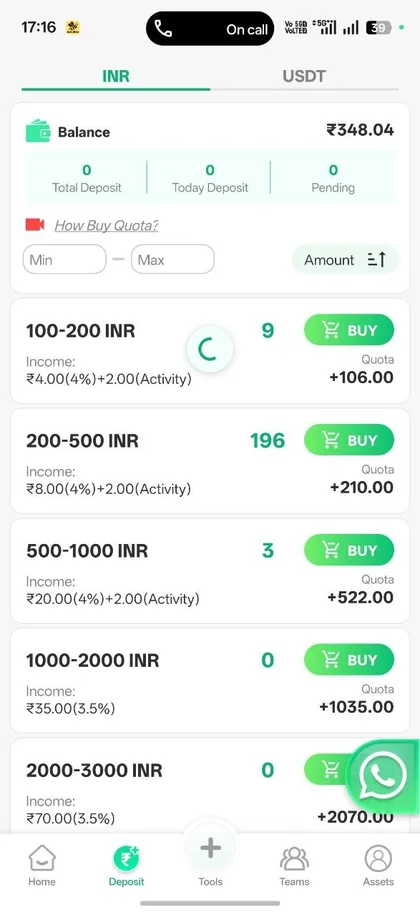
3. Buy Quota (Main Earning)
Open the Deposit / Buy section. Choose an available range:
- 100–200 INR → ≈4% + ₹2 activity bonus
- 200–500 INR → ≈4% + ₹2 activity
- 500–1000 INR → ≈4% + ₹2 activity
- 1000–2000 INR → ≈3.5%
- 2000–3000 INR → ≈3.5%
Complete the payment via the UPI shown in the order. Income is credited and Performance Quota updates.
4. Team & Referral
Open the Teams tab. Share your QR code or the referral link (share.ipaynow.net). Track Total Deposit, Team Commission, Success Orders, Active Users and New Users (Today / Weekly / Monthly).
5. Withdraw
Go to Assets / Withdrawal when you have balance. Enter amount and your bound UPI details. Follow any performance quota rules shown in the app.